
WEBCAST

Stop Emailing PDFs: A Better Way to Handle Tax Return Reviews

Watch your webcast below

Still emailing PDFs for tax return approvals? Discover a secure tax return review workflow that reduces back-and-forth, streamlines approvals, and collects payment before filing.

Oops! Something went wrong while submitting the form.

Ready to transform your practice's web presence?

Schedule a demo today
Webinar Series

Stop Emailing PDFs: A Better Way to Handle Tax Return Reviews

The return is finished.

You’ve done the hard part. The numbers tie out. The forms are clean. The strategy is sound.

And then…

You attach a PDF.

Now you’re waiting.

Did they open it?
Did they review it?
Did they approve it?
Did they miss page three?
Did they reply — or did their email get buried?

If you prepare more than a handful of 1040s each season, you already know this truth:

The tax return approval process is often the most disorganized part of the entire engagement.

And it’s the last impression your client gets.

The Hidden Chaos at the End of Tax Season

Most firms still handle tax return reviews like this:

  • Email the return
  • Wait for a reply
  • Clarify questions over multiple threads
  • Send a separate invoice
  • Follow up (again)
  • Confirm approval manually
  • Hope nothing slips through the cracks

It works. Technically.

But it creates friction — for you and for your client.

And in a world where clients expect secure portals, structured communication, and clean digital experiences, emailing sensitive tax documents back and forth doesn’t exactly inspire confidence.

If someone searches “secure way to send tax returns to clients” or “how to get tax return approval online,” what they’re really asking is this:

Isn’t there a better way to do this?

Yes. There is.

What a Modern Tax Return Review Workflow Should Actually Look Like

Instead of sending attachments and hoping for clarity, imagine this:

The return is marked complete.

Your client receives a notification directing them to a secure, SSL-protected client portal — not an email attachment.

Inside that portal, they see:

A personalized summary explaining their federal, state, and local outcomes in plain English.

Not just numbers. Context.

Set up a personalized summary of your client's federal, state, and local tax outcomes

They can review their documents, approve as-is, or request changes directly inside the secure environment.

No email threads.

No ambiguity.

No unsecured document sharing.

And if you choose, payment is required before filing — eliminating the awkward “just a reminder on that invoice…” conversation.

That’s not just a smoother process.

That’s a professional tax return review workflow.

Why Security Matters More Than Ever

Tax returns contain some of the most sensitive financial information a person has.

Social Security numbers.
Income details.
Bank information.
Dependent data.

Sending that information back and forth over traditional email creates risk — and increasingly, clients know it.

A secure tax return review portal keeps:

  • All documents in one encrypted location
  • All communication authenticated
  • All approvals documented
  • All activity trackable

No attachments floating in inboxes.
No forwarding to the wrong address.
No guessing whether approval was actually granted.

For firms thinking about client experience, security isn’t a technical feature.

It’s part of your brand.

From Compliance to Client Experience

Here’s what most tax software does well:

It calculates.

Here’s what most tax software doesn’t manage well:

The moment after calculation.

The tax return review process is where professionalism either compounds… or erodes.

When clients receive:

  • A structured summary
  • Clear next steps
  • A secure place to respond
  • A simple approval mechanism

You’re no longer “sending a return.”

You’re guiding a decision.

That subtle shift changes how your firm is perceived.

Collecting Payment Before Filing (Without Awkward Follow-Up)

Let’s talk about the other friction point.

Getting paid.

Many firms still file first and invoice second.

Which means chasing payments after the fact.

A structured tax return approval workflow allows you to:

Require payment before submission.
Tie approval and billing together.
Close the loop cleanly.

No chasing.
No uncomfortable reminders.
No filing before revenue is secured.

Operationally, that’s significant.

Reduce Back-and-Forth. Save Real Time.

Every “quick clarification” email adds up.

Every missed approval adds stress.

Every delayed payment extends the engagement lifecycle.

When you centralize review, approval, comments, and payment inside one secure client portal, you eliminate:

  • Duplicate communication
  • Confusion about next steps
  • Lost email threads
  • Unclear approval status

Multiply that by 100+ clients in a season, and the time savings are real.

So is the mental relief.
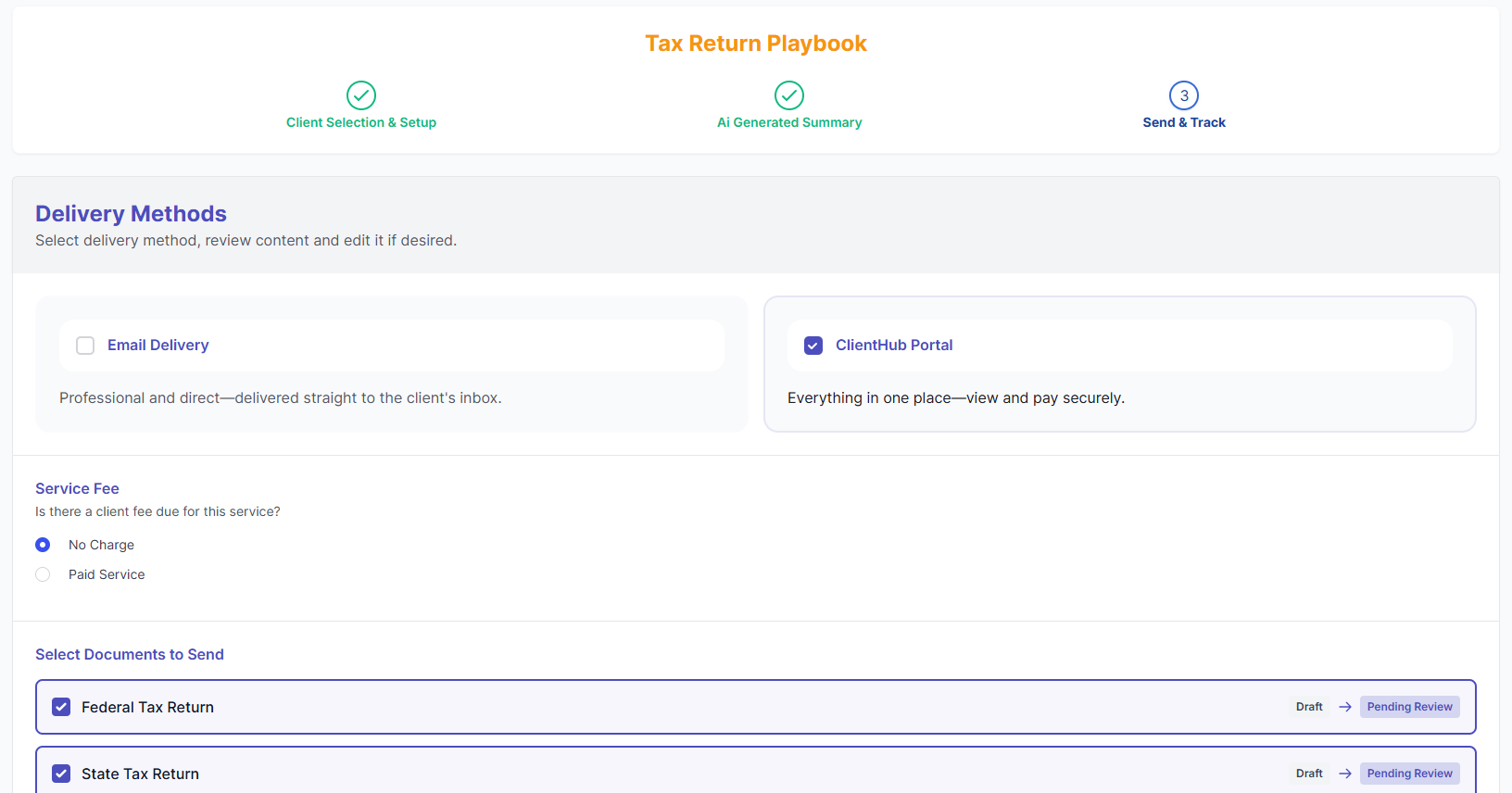
An automatic Tax Return Playbook that lets you customize the communication process with your tax service clients

A Smarter Way to Handle Tax Return Approvals

If you’ve ever searched:

  • “How to streamline tax return approvals”
  • “Best way to send tax returns securely to clients”
  • “Collect payment before filing tax return”
  • “Client portal for tax return review”

You’re not looking for another PDF tool.

You’re looking for structure.

A repeatable, secure, professional way to close every engagement.

Because the return may be the deliverable.

But the experience is what clients remember.

See How the Tax Return Review Workflow Works

We’ve built a streamlined, secure tax return review process that helps firms:

  • Present returns clearly
  • Reduce email chaos
  • Collect payment efficiently
  • Protect sensitive information
  • Finish engagements professionally

If you’re ready to modernize how you handle tax return approvals, the next step is simple.

Watch the walkthrough and see the workflow in action.

Because tax season is busy enough.

The review process shouldn’t make it harder.

Tactical Tuesday

Stop Emailing PDFs: A Better Way to Handle Tax Return Reviews

The return is finished.

You’ve done the hard part. The numbers tie out. The forms are clean. The strategy is sound.

And then…

You attach a PDF.

Now you’re waiting.

Did they open it?
Did they review it?
Did they approve it?
Did they miss page three?
Did they reply — or did their email get buried?

If you prepare more than a handful of 1040s each season, you already know this truth:

The tax return approval process is often the most disorganized part of the entire engagement.

And it’s the last impression your client gets.

The Hidden Chaos at the End of Tax Season

Most firms still handle tax return reviews like this:

  • Email the return
  • Wait for a reply
  • Clarify questions over multiple threads
  • Send a separate invoice
  • Follow up (again)
  • Confirm approval manually
  • Hope nothing slips through the cracks

It works. Technically.

But it creates friction — for you and for your client.

And in a world where clients expect secure portals, structured communication, and clean digital experiences, emailing sensitive tax documents back and forth doesn’t exactly inspire confidence.

If someone searches “secure way to send tax returns to clients” or “how to get tax return approval online,” what they’re really asking is this:

Isn’t there a better way to do this?

Yes. There is.

What a Modern Tax Return Review Workflow Should Actually Look Like

Instead of sending attachments and hoping for clarity, imagine this:

The return is marked complete.

Your client receives a notification directing them to a secure, SSL-protected client portal — not an email attachment.

Inside that portal, they see:

A personalized summary explaining their federal, state, and local outcomes in plain English.

Not just numbers. Context.

Set up a personalized summary of your client's federal, state, and local tax outcomes

They can review their documents, approve as-is, or request changes directly inside the secure environment.

No email threads.

No ambiguity.

No unsecured document sharing.

And if you choose, payment is required before filing — eliminating the awkward “just a reminder on that invoice…” conversation.

That’s not just a smoother process.

That’s a professional tax return review workflow.

Why Security Matters More Than Ever

Tax returns contain some of the most sensitive financial information a person has.

Social Security numbers.
Income details.
Bank information.
Dependent data.

Sending that information back and forth over traditional email creates risk — and increasingly, clients know it.

A secure tax return review portal keeps:

  • All documents in one encrypted location
  • All communication authenticated
  • All approvals documented
  • All activity trackable

No attachments floating in inboxes.
No forwarding to the wrong address.
No guessing whether approval was actually granted.

For firms thinking about client experience, security isn’t a technical feature.

It’s part of your brand.

From Compliance to Client Experience

Here’s what most tax software does well:

It calculates.

Here’s what most tax software doesn’t manage well:

The moment after calculation.

The tax return review process is where professionalism either compounds… or erodes.

When clients receive:

  • A structured summary
  • Clear next steps
  • A secure place to respond
  • A simple approval mechanism

You’re no longer “sending a return.”

You’re guiding a decision.

That subtle shift changes how your firm is perceived.

Collecting Payment Before Filing (Without Awkward Follow-Up)

Let’s talk about the other friction point.

Getting paid.

Many firms still file first and invoice second.

Which means chasing payments after the fact.

A structured tax return approval workflow allows you to:

Require payment before submission.
Tie approval and billing together.
Close the loop cleanly.

No chasing.
No uncomfortable reminders.
No filing before revenue is secured.

Operationally, that’s significant.

Reduce Back-and-Forth. Save Real Time.

Every “quick clarification” email adds up.

Every missed approval adds stress.

Every delayed payment extends the engagement lifecycle.

When you centralize review, approval, comments, and payment inside one secure client portal, you eliminate:

  • Duplicate communication
  • Confusion about next steps
  • Lost email threads
  • Unclear approval status

Multiply that by 100+ clients in a season, and the time savings are real.

So is the mental relief.

An automatic Tax Return Playbook that lets you customize the communication process with your tax service clients

A Smarter Way to Handle Tax Return Approvals

If you’ve ever searched:

  • “How to streamline tax return approvals”
  • “Best way to send tax returns securely to clients”
  • “Collect payment before filing tax return”
  • “Client portal for tax return review”

You’re not looking for another PDF tool.

You’re looking for structure.

A repeatable, secure, professional way to close every engagement.

Because the return may be the deliverable.

But the experience is what clients remember.

See How the Tax Return Review Workflow Works

We’ve built a streamlined, secure tax return review process that helps firms:

  • Present returns clearly
  • Reduce email chaos
  • Collect payment efficiently
  • Protect sensitive information
  • Finish engagements professionally

If you’re ready to modernize how you handle tax return approvals, the next step is simple.

Watch the walkthrough and see the workflow in action.

Because tax season is busy enough.

The review process shouldn’t make it harder.

Already a Client and Have Questions?

Send Us an Email to help@countingworkspro.com

Or call our team at 1-800-442-2477.

First Time Hearing About Our Product?

Speak To Us and See Our Product In Action
Webinar Series

Stop Emailing PDFs: A Better Way to Handle Tax Return Reviews

The return is finished.

You’ve done the hard part. The numbers tie out. The forms are clean. The strategy is sound.

And then…

You attach a PDF.

Now you’re waiting.

Did they open it?
Did they review it?
Did they approve it?
Did they miss page three?
Did they reply — or did their email get buried?

If you prepare more than a handful of 1040s each season, you already know this truth:

The tax return approval process is often the most disorganized part of the entire engagement.

And it’s the last impression your client gets.

The Hidden Chaos at the End of Tax Season

Most firms still handle tax return reviews like this:

  • Email the return
  • Wait for a reply
  • Clarify questions over multiple threads
  • Send a separate invoice
  • Follow up (again)
  • Confirm approval manually
  • Hope nothing slips through the cracks

It works. Technically.

But it creates friction — for you and for your client.

And in a world where clients expect secure portals, structured communication, and clean digital experiences, emailing sensitive tax documents back and forth doesn’t exactly inspire confidence.

If someone searches “secure way to send tax returns to clients” or “how to get tax return approval online,” what they’re really asking is this:

Isn’t there a better way to do this?

Yes. There is.

What a Modern Tax Return Review Workflow Should Actually Look Like

Instead of sending attachments and hoping for clarity, imagine this:

The return is marked complete.

Your client receives a notification directing them to a secure, SSL-protected client portal — not an email attachment.

Inside that portal, they see:

A personalized summary explaining their federal, state, and local outcomes in plain English.

Not just numbers. Context.

Set up a personalized summary of your client's federal, state, and local tax outcomes

They can review their documents, approve as-is, or request changes directly inside the secure environment.

No email threads.

No ambiguity.

No unsecured document sharing.

And if you choose, payment is required before filing — eliminating the awkward “just a reminder on that invoice…” conversation.

That’s not just a smoother process.

That’s a professional tax return review workflow.

Why Security Matters More Than Ever

Tax returns contain some of the most sensitive financial information a person has.

Social Security numbers.
Income details.
Bank information.
Dependent data.

Sending that information back and forth over traditional email creates risk — and increasingly, clients know it.

A secure tax return review portal keeps:

  • All documents in one encrypted location
  • All communication authenticated
  • All approvals documented
  • All activity trackable

No attachments floating in inboxes.
No forwarding to the wrong address.
No guessing whether approval was actually granted.

For firms thinking about client experience, security isn’t a technical feature.

It’s part of your brand.

From Compliance to Client Experience

Here’s what most tax software does well:

It calculates.

Here’s what most tax software doesn’t manage well:

The moment after calculation.

The tax return review process is where professionalism either compounds… or erodes.

When clients receive:

  • A structured summary
  • Clear next steps
  • A secure place to respond
  • A simple approval mechanism

You’re no longer “sending a return.”

You’re guiding a decision.

That subtle shift changes how your firm is perceived.

Collecting Payment Before Filing (Without Awkward Follow-Up)

Let’s talk about the other friction point.

Getting paid.

Many firms still file first and invoice second.

Which means chasing payments after the fact.

A structured tax return approval workflow allows you to:

Require payment before submission.
Tie approval and billing together.
Close the loop cleanly.

No chasing.
No uncomfortable reminders.
No filing before revenue is secured.

Operationally, that’s significant.

Reduce Back-and-Forth. Save Real Time.

Every “quick clarification” email adds up.

Every missed approval adds stress.

Every delayed payment extends the engagement lifecycle.

When you centralize review, approval, comments, and payment inside one secure client portal, you eliminate:

  • Duplicate communication
  • Confusion about next steps
  • Lost email threads
  • Unclear approval status

Multiply that by 100+ clients in a season, and the time savings are real.

So is the mental relief.

An automatic Tax Return Playbook that lets you customize the communication process with your tax service clients

A Smarter Way to Handle Tax Return Approvals

If you’ve ever searched:

  • “How to streamline tax return approvals”
  • “Best way to send tax returns securely to clients”
  • “Collect payment before filing tax return”
  • “Client portal for tax return review”

You’re not looking for another PDF tool.

You’re looking for structure.

A repeatable, secure, professional way to close every engagement.

Because the return may be the deliverable.

But the experience is what clients remember.

See How the Tax Return Review Workflow Works

We’ve built a streamlined, secure tax return review process that helps firms:

  • Present returns clearly
  • Reduce email chaos
  • Collect payment efficiently
  • Protect sensitive information
  • Finish engagements professionally

If you’re ready to modernize how you handle tax return approvals, the next step is simple.

Watch the walkthrough and see the workflow in action.

Because tax season is busy enough.

The review process shouldn’t make it harder.

Guide

Stop Emailing PDFs: A Better Way to Handle Tax Return Reviews

The return is finished.

You’ve done the hard part. The numbers tie out. The forms are clean. The strategy is sound.

And then…

You attach a PDF.

Now you’re waiting.

Did they open it?
Did they review it?
Did they approve it?
Did they miss page three?
Did they reply — or did their email get buried?

If you prepare more than a handful of 1040s each season, you already know this truth:

The tax return approval process is often the most disorganized part of the entire engagement.

And it’s the last impression your client gets.

The Hidden Chaos at the End of Tax Season

Most firms still handle tax return reviews like this:

  • Email the return
  • Wait for a reply
  • Clarify questions over multiple threads
  • Send a separate invoice
  • Follow up (again)
  • Confirm approval manually
  • Hope nothing slips through the cracks

It works. Technically.

But it creates friction — for you and for your client.

And in a world where clients expect secure portals, structured communication, and clean digital experiences, emailing sensitive tax documents back and forth doesn’t exactly inspire confidence.

If someone searches “secure way to send tax returns to clients” or “how to get tax return approval online,” what they’re really asking is this:

Isn’t there a better way to do this?

Yes. There is.

What a Modern Tax Return Review Workflow Should Actually Look Like

Instead of sending attachments and hoping for clarity, imagine this:

The return is marked complete.

Your client receives a notification directing them to a secure, SSL-protected client portal — not an email attachment.

Inside that portal, they see:

A personalized summary explaining their federal, state, and local outcomes in plain English.

Not just numbers. Context.

Set up a personalized summary of your client's federal, state, and local tax outcomes

They can review their documents, approve as-is, or request changes directly inside the secure environment.

No email threads.

No ambiguity.

No unsecured document sharing.

And if you choose, payment is required before filing — eliminating the awkward “just a reminder on that invoice…” conversation.

That’s not just a smoother process.

That’s a professional tax return review workflow.

Why Security Matters More Than Ever

Tax returns contain some of the most sensitive financial information a person has.

Social Security numbers.
Income details.
Bank information.
Dependent data.

Sending that information back and forth over traditional email creates risk — and increasingly, clients know it.

A secure tax return review portal keeps:

  • All documents in one encrypted location
  • All communication authenticated
  • All approvals documented
  • All activity trackable

No attachments floating in inboxes.
No forwarding to the wrong address.
No guessing whether approval was actually granted.

For firms thinking about client experience, security isn’t a technical feature.

It’s part of your brand.

From Compliance to Client Experience

Here’s what most tax software does well:

It calculates.

Here’s what most tax software doesn’t manage well:

The moment after calculation.

The tax return review process is where professionalism either compounds… or erodes.

When clients receive:

  • A structured summary
  • Clear next steps
  • A secure place to respond
  • A simple approval mechanism

You’re no longer “sending a return.”

You’re guiding a decision.

That subtle shift changes how your firm is perceived.

Collecting Payment Before Filing (Without Awkward Follow-Up)

Let’s talk about the other friction point.

Getting paid.

Many firms still file first and invoice second.

Which means chasing payments after the fact.

A structured tax return approval workflow allows you to:

Require payment before submission.
Tie approval and billing together.
Close the loop cleanly.

No chasing.
No uncomfortable reminders.
No filing before revenue is secured.

Operationally, that’s significant.

Reduce Back-and-Forth. Save Real Time.

Every “quick clarification” email adds up.

Every missed approval adds stress.

Every delayed payment extends the engagement lifecycle.

When you centralize review, approval, comments, and payment inside one secure client portal, you eliminate:

  • Duplicate communication
  • Confusion about next steps
  • Lost email threads
  • Unclear approval status

Multiply that by 100+ clients in a season, and the time savings are real.

So is the mental relief.

An automatic Tax Return Playbook that lets you customize the communication process with your tax service clients

A Smarter Way to Handle Tax Return Approvals

If you’ve ever searched:

  • “How to streamline tax return approvals”
  • “Best way to send tax returns securely to clients”
  • “Collect payment before filing tax return”
  • “Client portal for tax return review”

You’re not looking for another PDF tool.

You’re looking for structure.

A repeatable, secure, professional way to close every engagement.

Because the return may be the deliverable.

But the experience is what clients remember.

See How the Tax Return Review Workflow Works

We’ve built a streamlined, secure tax return review process that helps firms:

  • Present returns clearly
  • Reduce email chaos
  • Collect payment efficiently
  • Protect sensitive information
  • Finish engagements professionally

If you’re ready to modernize how you handle tax return approvals, the next step is simple.

Watch the walkthrough and see the workflow in action.

Because tax season is busy enough.

The review process shouldn’t make it harder.

Products & Features

Stop Emailing PDFs: A Better Way to Handle Tax Return Reviews

February 18, 2026
/
10
min read

The return is finished.

You’ve done the hard part. The numbers tie out. The forms are clean. The strategy is sound.

And then…

You attach a PDF.

Now you’re waiting.

Did they open it?
Did they review it?
Did they approve it?
Did they miss page three?
Did they reply — or did their email get buried?

If you prepare more than a handful of 1040s each season, you already know this truth:

The tax return approval process is often the most disorganized part of the entire engagement.

And it’s the last impression your client gets.

The Hidden Chaos at the End of Tax Season

Most firms still handle tax return reviews like this:

  • Email the return
  • Wait for a reply
  • Clarify questions over multiple threads
  • Send a separate invoice
  • Follow up (again)
  • Confirm approval manually
  • Hope nothing slips through the cracks

It works. Technically.

But it creates friction — for you and for your client.

And in a world where clients expect secure portals, structured communication, and clean digital experiences, emailing sensitive tax documents back and forth doesn’t exactly inspire confidence.

If someone searches “secure way to send tax returns to clients” or “how to get tax return approval online,” what they’re really asking is this:

Isn’t there a better way to do this?

Yes. There is.

What a Modern Tax Return Review Workflow Should Actually Look Like

Instead of sending attachments and hoping for clarity, imagine this:

The return is marked complete.

Your client receives a notification directing them to a secure, SSL-protected client portal — not an email attachment.

Inside that portal, they see:

A personalized summary explaining their federal, state, and local outcomes in plain English.

Not just numbers. Context.

Set up a personalized summary of your client's federal, state, and local tax outcomes

They can review their documents, approve as-is, or request changes directly inside the secure environment.

No email threads.

No ambiguity.

No unsecured document sharing.

And if you choose, payment is required before filing — eliminating the awkward “just a reminder on that invoice…” conversation.

That’s not just a smoother process.

That’s a professional tax return review workflow.

Why Security Matters More Than Ever

Tax returns contain some of the most sensitive financial information a person has.

Social Security numbers.
Income details.
Bank information.
Dependent data.

Sending that information back and forth over traditional email creates risk — and increasingly, clients know it.

A secure tax return review portal keeps:

  • All documents in one encrypted location
  • All communication authenticated
  • All approvals documented
  • All activity trackable

No attachments floating in inboxes.
No forwarding to the wrong address.
No guessing whether approval was actually granted.

For firms thinking about client experience, security isn’t a technical feature.

It’s part of your brand.

From Compliance to Client Experience

Here’s what most tax software does well:

It calculates.

Here’s what most tax software doesn’t manage well:

The moment after calculation.

The tax return review process is where professionalism either compounds… or erodes.

When clients receive:

  • A structured summary
  • Clear next steps
  • A secure place to respond
  • A simple approval mechanism

You’re no longer “sending a return.”

You’re guiding a decision.

That subtle shift changes how your firm is perceived.

Collecting Payment Before Filing (Without Awkward Follow-Up)

Let’s talk about the other friction point.

Getting paid.

Many firms still file first and invoice second.

Which means chasing payments after the fact.

A structured tax return approval workflow allows you to:

Require payment before submission.
Tie approval and billing together.
Close the loop cleanly.

No chasing.
No uncomfortable reminders.
No filing before revenue is secured.

Operationally, that’s significant.

Reduce Back-and-Forth. Save Real Time.

Every “quick clarification” email adds up.

Every missed approval adds stress.

Every delayed payment extends the engagement lifecycle.

When you centralize review, approval, comments, and payment inside one secure client portal, you eliminate:

  • Duplicate communication
  • Confusion about next steps
  • Lost email threads
  • Unclear approval status

Multiply that by 100+ clients in a season, and the time savings are real.

So is the mental relief.

An automatic Tax Return Playbook that lets you customize the communication process with your tax service clients

A Smarter Way to Handle Tax Return Approvals

If you’ve ever searched:

  • “How to streamline tax return approvals”
  • “Best way to send tax returns securely to clients”
  • “Collect payment before filing tax return”
  • “Client portal for tax return review”

You’re not looking for another PDF tool.

You’re looking for structure.

A repeatable, secure, professional way to close every engagement.

Because the return may be the deliverable.

But the experience is what clients remember.

See How the Tax Return Review Workflow Works

We’ve built a streamlined, secure tax return review process that helps firms:

  • Present returns clearly
  • Reduce email chaos
  • Collect payment efficiently
  • Protect sensitive information
  • Finish engagements professionally

If you’re ready to modernize how you handle tax return approvals, the next step is simple.

Watch the walkthrough and see the workflow in action.

Because tax season is busy enough.

The review process shouldn’t make it harder.

Products & Features

Stop Emailing PDFs: A Better Way to Handle Tax Return Reviews

Wednesday, February 18, 2026

February 19, 2026
/
10
min read

The return is finished.

You’ve done the hard part. The numbers tie out. The forms are clean. The strategy is sound.

And then…

You attach a PDF.

Now you’re waiting.

Did they open it?
Did they review it?
Did they approve it?
Did they miss page three?
Did they reply — or did their email get buried?

If you prepare more than a handful of 1040s each season, you already know this truth:

The tax return approval process is often the most disorganized part of the entire engagement.

And it’s the last impression your client gets.

The Hidden Chaos at the End of Tax Season

Most firms still handle tax return reviews like this:

  • Email the return
  • Wait for a reply
  • Clarify questions over multiple threads
  • Send a separate invoice
  • Follow up (again)
  • Confirm approval manually
  • Hope nothing slips through the cracks

It works. Technically.

But it creates friction — for you and for your client.

And in a world where clients expect secure portals, structured communication, and clean digital experiences, emailing sensitive tax documents back and forth doesn’t exactly inspire confidence.

If someone searches “secure way to send tax returns to clients” or “how to get tax return approval online,” what they’re really asking is this:

Isn’t there a better way to do this?

Yes. There is.

What a Modern Tax Return Review Workflow Should Actually Look Like

Instead of sending attachments and hoping for clarity, imagine this:

The return is marked complete.

Your client receives a notification directing them to a secure, SSL-protected client portal — not an email attachment.

Inside that portal, they see:

A personalized summary explaining their federal, state, and local outcomes in plain English.

Not just numbers. Context.

Set up a personalized summary of your client's federal, state, and local tax outcomes

They can review their documents, approve as-is, or request changes directly inside the secure environment.

No email threads.

No ambiguity.

No unsecured document sharing.

And if you choose, payment is required before filing — eliminating the awkward “just a reminder on that invoice…” conversation.

That’s not just a smoother process.

That’s a professional tax return review workflow.

Why Security Matters More Than Ever

Tax returns contain some of the most sensitive financial information a person has.

Social Security numbers.
Income details.
Bank information.
Dependent data.

Sending that information back and forth over traditional email creates risk — and increasingly, clients know it.

A secure tax return review portal keeps:

  • All documents in one encrypted location
  • All communication authenticated
  • All approvals documented
  • All activity trackable

No attachments floating in inboxes.
No forwarding to the wrong address.
No guessing whether approval was actually granted.

For firms thinking about client experience, security isn’t a technical feature.

It’s part of your brand.

From Compliance to Client Experience

Here’s what most tax software does well:

It calculates.

Here’s what most tax software doesn’t manage well:

The moment after calculation.

The tax return review process is where professionalism either compounds… or erodes.

When clients receive:

  • A structured summary
  • Clear next steps
  • A secure place to respond
  • A simple approval mechanism

You’re no longer “sending a return.”

You’re guiding a decision.

That subtle shift changes how your firm is perceived.

Collecting Payment Before Filing (Without Awkward Follow-Up)

Let’s talk about the other friction point.

Getting paid.

Many firms still file first and invoice second.

Which means chasing payments after the fact.

A structured tax return approval workflow allows you to:

Require payment before submission.
Tie approval and billing together.
Close the loop cleanly.

No chasing.
No uncomfortable reminders.
No filing before revenue is secured.

Operationally, that’s significant.

Reduce Back-and-Forth. Save Real Time.

Every “quick clarification” email adds up.

Every missed approval adds stress.

Every delayed payment extends the engagement lifecycle.

When you centralize review, approval, comments, and payment inside one secure client portal, you eliminate:

  • Duplicate communication
  • Confusion about next steps
  • Lost email threads
  • Unclear approval status

Multiply that by 100+ clients in a season, and the time savings are real.

So is the mental relief.

An automatic Tax Return Playbook that lets you customize the communication process with your tax service clients

A Smarter Way to Handle Tax Return Approvals

If you’ve ever searched:

  • “How to streamline tax return approvals”
  • “Best way to send tax returns securely to clients”
  • “Collect payment before filing tax return”
  • “Client portal for tax return review”

You’re not looking for another PDF tool.

You’re looking for structure.

A repeatable, secure, professional way to close every engagement.

Because the return may be the deliverable.

But the experience is what clients remember.

See How the Tax Return Review Workflow Works

We’ve built a streamlined, secure tax return review process that helps firms:

  • Present returns clearly
  • Reduce email chaos
  • Collect payment efficiently
  • Protect sensitive information
  • Finish engagements professionally

If you’re ready to modernize how you handle tax return approvals, the next step is simple.

Watch the walkthrough and see the workflow in action.

Because tax season is busy enough.

The review process shouldn’t make it harder.

Continue Reading...

Continue Reading...

Rank in the AI Age with CountingWorks PRO

Talk to a human
Create a year-long tax planning strategy for a freelancer earning $75,000 with multiple 1099 clients.

Below is a personalized, year-long tax planning strategy developed by CountingWorks, Inc., specifically for a freelancer earning $75,000 with multiple 1099 clients....

1. Establish a Robust Recordkeeping System

  • Dedicated Business Accounts: Open a separate business bank account and credit card to clearly define your income and expenses. This step not only simplifies your tax documentation but also aligns with our best-practices at CountingWorks.
  • ...

2. Manage Quarterly Estimated Tax Payments
...

Thank you! This is so helpful.
Gladly! Remember, you can also turn this information into audio and send to your clients directly via ClientHub.